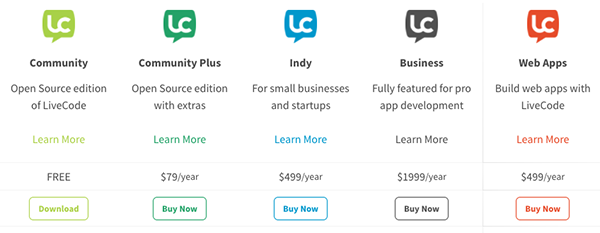
I have been using LiveCode to develop numerous desktop and mobile APPs over the years. LiveCode has never failed me and always gets the job done with less time and effort.

In 2022, I started Web3, blockchain, crypto currency, and NFT related development work. On top of many new things to learn, I am using LiveCode in a different way to develop over a dozen Web3 services delivered via web pages. This is a big challenge for me since I am not using “LiveCode Web” deployment (which may change when LiveCode 10 is released). I am only using LiveCode for the backend server side and use CSS/Javascript for the frontend client side. Still, I find LiveCode can help me get the job done as before.

Below are what I’ve learned from this new development experience:
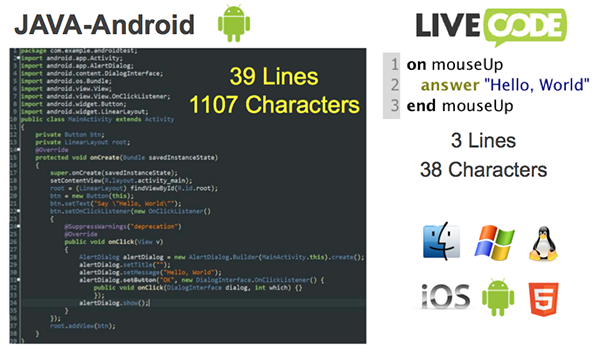
- Using LiveCode to interface with any 3rd party APIs including blockchain, crypto currency, and NFT APIs is a breeze no matter if they are GET, POST, or PUT. The only drawback I found is I can’t find the sample code for LiveCode to use the APIs from these 3rd party sites. Sample code is needed for programming languages that are difficult to learn and use. It is not a problem for LiveCode since it can get the job done more straightforward with less code (normally 1 to 10 lines of code) than other languages so there is really no need for sample code.
📍Example Code: 5 lines of code to get Bitcoin to USD exchange dataset the HTTPHeaders to "CB-VERSION", "2018-01-01"
put url ("https://api.coinbase.com/v2/exchange-rates?currency=BTC") into tdata
put jsonToArray(tdata) into tdataA
put tdataA["data"]["rates"]["USD"] into tusd
set the HTTPHeaders to "" - Using LiveCode on the server side can fill all my needs without resorting to other languages such as PHP, JSP, ASP, Perl, Python, Ruby, JAVA… I can even set up CRON jobs to run LiveCode scripts (e.g., making API calls to gather specific data) to handle routine work at any given time intervals!
📍Example Code: 1 line of code to set up news crawler CRON jobcurl https://hhott.com/news/crawler.lc
- Embedding LiveCode in web pages mixed with HTML, CSS, and Javascript to provide backend data and support for these pages is not a problem. There are simple ways to exchange data between LiveCode and Javascript so there is no limit on what I can do to integrate backend and frontend data.
📍Example Code: 1 line of code to save a LiveCode variable value in a document object to use in Javascriptput "<span id='mid'>" & tmid & "</span>"
- I can create my own backend APIs in LiveCode and call these APIs from Javascript in the frontend web pages. This seamless integration between backend LiveCode and frontend Javascript helps me realize any features I need and I can imagine.
📍Example Code: 19-line LiveCode AddFavNews API to add/remove a favored newsput $_POST_RAW into tRequest
put jsonToArray(tRequest) into tRequestA
put tRequestA["tid"] into tfid
put tRequestA["mid"] into tmid
put revOpenDatabase("MySQL", tDatabaseAddress, tDatabaseName, tDatabaseUser, tDatabasePassword) into tResult
if tResult is a number then
put tResult into gConnectionID
put "SELECT tid FROM favnews WHERE memid=" & tmid & " and fid=" & tfid into tSQL
put revDataFromQuery(tab, cr, gConnectionID, tSQL) into tdata
if tdata = "" then
put "memid, fid" into tFields
put "INSERT INTO favnews (" & tFields & ") VALUES (:1, :2)" into tSQL
revExecuteSQL gConnectionID, tSQL, "tmid", "tfid"
else
put "delete from favnews WHERE memid=" & tmid & " and fid=" & tfid into tSQL
revExecuteSQL gConnectionID, tSQL
end if
revCloseDatabase gConnectionID
end if
📍Example Code: 15 lines of Javascript code to call LiveCode AddFavNews API (LiveCode variable values stored in document objects are used in Javascript)async function addfavnews() {
var x=document.getElementById("tid").innerHTML;
var y=document.getElementById("mid").innerHTML;
let url = 'https://hhott.com/addfavnews.lc';
let res = await fetch(url, {
method: 'POST',
headers: {
'Content-Type': 'application/json',
},
body: JSON.stringify({
tid:x,
mid:y,
}),
});
}
To complete my Web3 services, I did spend a lot of time learning CSS and Javascript for the frontend web pages. I hope I can leave HTML, CSS, and Javascript all behind and leapfrog to LiveCode 10 Web deployment when it becomes available. I can’t wait for that to happen since I can get a lot more work done with a lot less effort. More importantly, a lot of work I’ve done in LiveCode in the past can be put directly on the web! Whenever I think about this, I got really excited!
OK. Don’t just take my words for it. You can check out the work I’ve done from the links below to experience it yourself. Everything you see is all done by myself. YES, one person does all the coding and even the (not too professional) graphic work! I don’t think it is possible for me to do all these work alone with any other languages.
The following is to share the insights and thoughts I have gathered in the past year from developing Web3 services, and my plan for 2023. You can also find out what makes up a Web3 service.
📍 Reflecting on 2022, Anticipating 2023 (inspired by Heather)
🔗 https://hhott.com/en/reflecting-on-2022-anticipating-2023/
Also, my first Web3 news reader game “HHOTT News” has been completed and I would like to invite everyone to test and experience it. HHOTT News is one of the first 10 Web3 services I plan to release in 2023. It is the easiest one so it got released first. The coding part of all other services is mostly done. I just need to do more testing and complete the documentation. (And I would appreciate very much if someone can help.)
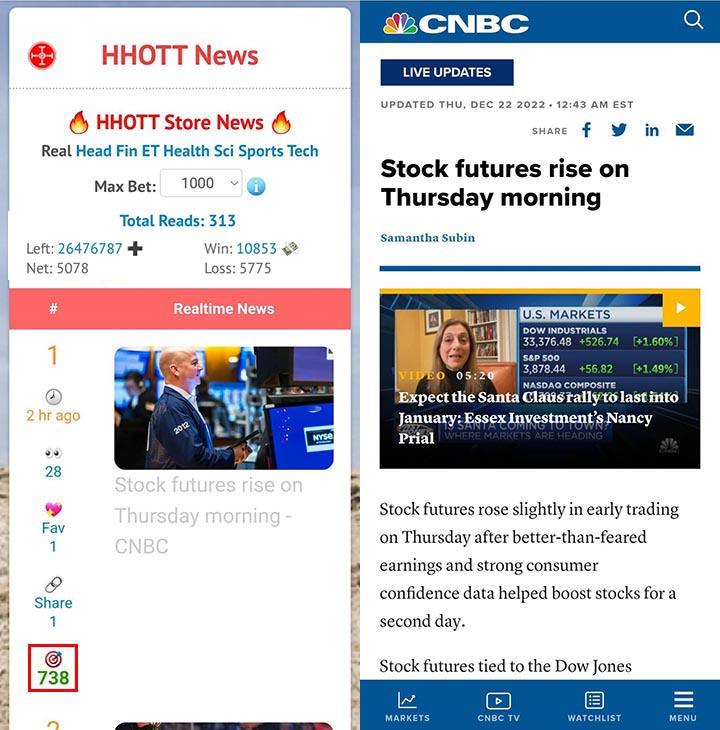
📍 Promote HHOTT News to the world
🔗 https://hhott.com/freenewsen.lc (mainly US news)
🔗 https://hhott.com/en/promote-hhott-news-to-the-world/ (more info)
📍 First 10 Web3 services to release in 2023
🔗 https://hhott.com/en/introduction/
Last but not least, LiveCode’s unicode support works really great for i18n (internationalization) development. Below is HHOTT News in traditional Chinese. The news sources I collected can support more than 50 countries and languages. Let me know if you are interested in developing a version for your country and language. It could be as simple as changing the two-letter country code.
📍 向全世界推廣熱透頭條 (繁體中文版)
🔗 https://hhott.com/freenewstc.lc (mainly Taiwan news)
🔗 https://hhott.com/tc/向全世界推廣熱透頭條/ (more info)
By combining creativity and the latest blockchain and NFT technology, I am very confident I can build outstanding Web3 services using LiveCode. And I truly believe LiveCode is the best tool to build world-class Web3 services.
Finally, I would like to conclude this blog with an invitation to like-minded friends to join me and work as a team for the better future of Web3 and LiveCode in 2023 and beyond. You can be a developer, a marketer, a promoter, an evangelist, or whatever role you would like to play. Please hit me up if you are interested. Maybe we can all be part of “LiveCode DAO”. I am looking forward to hearing from you.
HHOTT Founder
Andy Parng
#LiveCode #Web3 #Blockchain #NFT